Terms of Service
BuildStack AI, Inc.
A Delaware Corporation
1701 South 7th Street, Unit 1, San Jose, CA 95112
Last Updated: April 10, 2026
1. Introduction and Acceptance
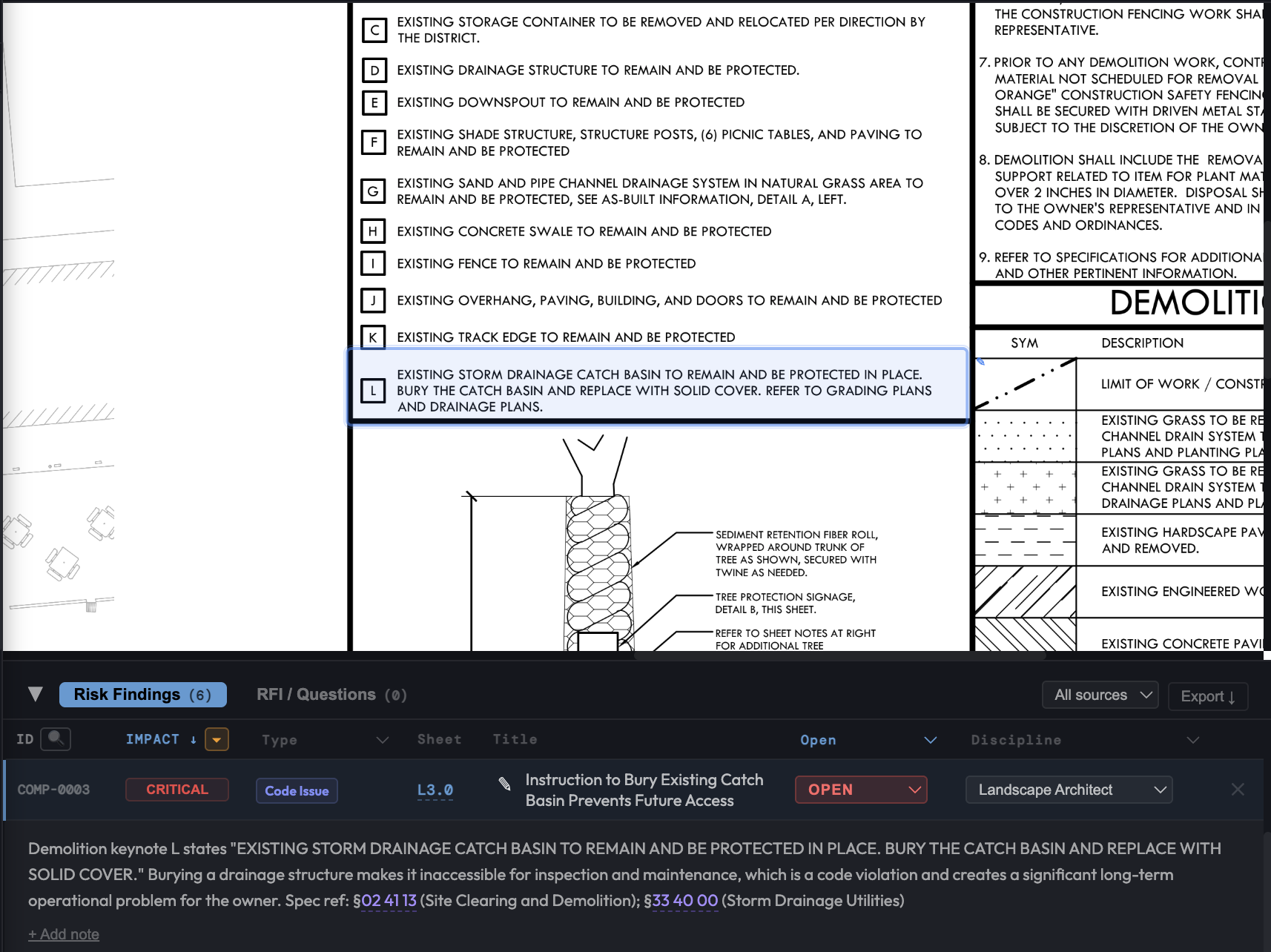
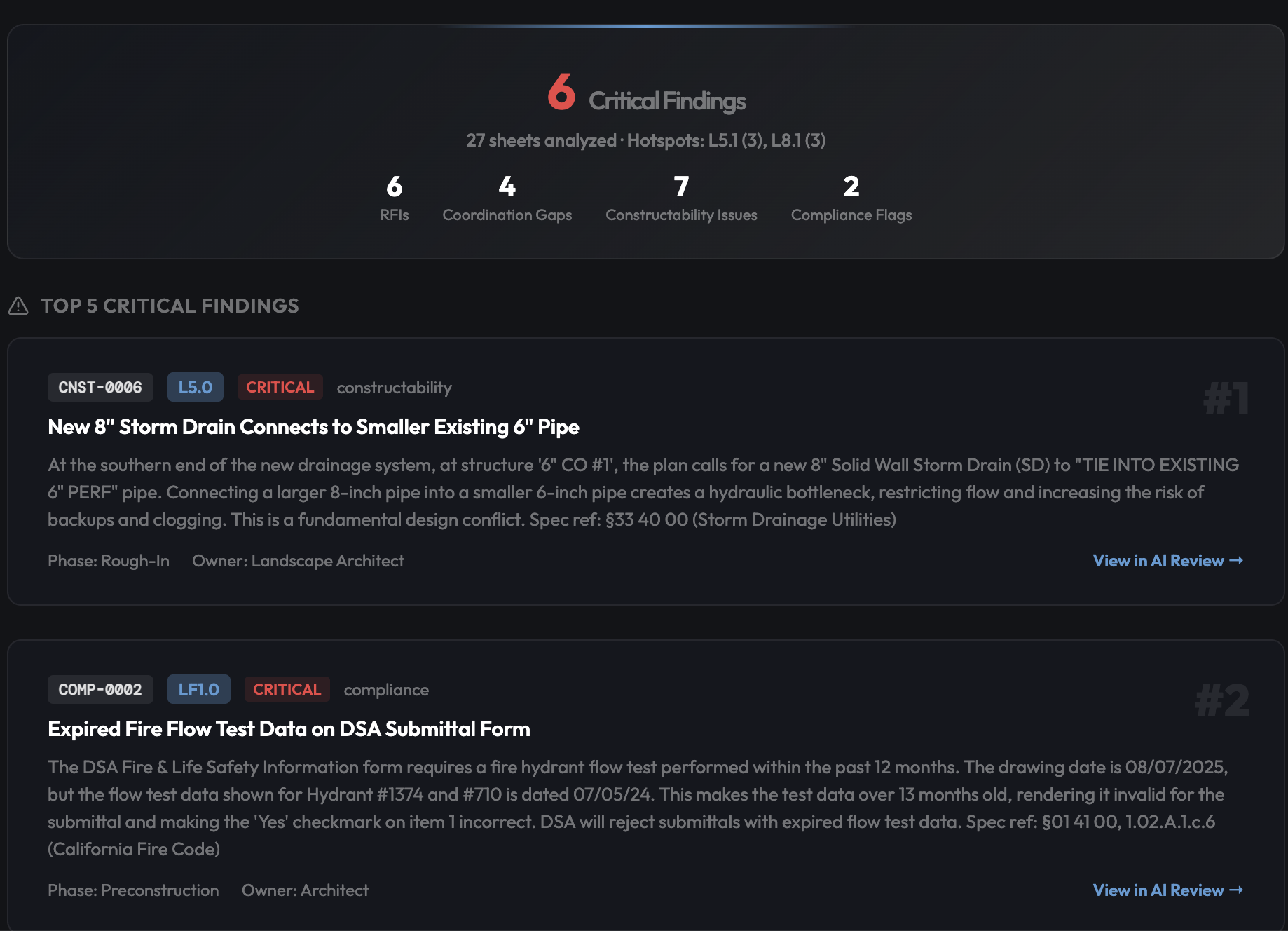
These Terms of Service (“Terms”) govern your access to and use of the BuildStack AI platform (the “Service”), operated by BuildStack AI, Inc., a Delaware corporation (“we,” “us,” or “our”). The Service is a construction drawing risk analysis tool that uses artificial intelligence to identify potential code compliance issues, missing references, and plan review risks.
By creating an account, accessing, or using the Service, you agree to be bound by these Terms. If you are using the Service on behalf of an organization, you represent that you have authority to bind that organization to these Terms. If you do not agree, do not use the Service.
2. Definitions
- “Customer Data” — all files, documents, drawings, specifications, project metadata, and other content you upload to or create within the Service.
- “AI Outputs” — all analysis results, findings, issues, recommendations, and other outputs generated by the Service’s AI capabilities.
- “Account” — your registered account used to access the Service.
- “User” or “you” — the individual or entity accessing or using the Service.
- “Subscription” — your purchased plan granting access to the Service for a specified term.
3. Account Registration and Security
3.1 Account Creation
To use the Service, you must sign in using a supported authentication method (such as third-party OAuth providers or other methods we make available). You agree to provide accurate and complete information and to keep your account credentials secure.
3.2 Account Responsibilities
You are responsible for:
- All activity that occurs under your account
- Maintaining the confidentiality of your authentication credentials
- Notifying us immediately at privacy@buildstackai.com if you suspect unauthorized access
- Ensuring that anyone who accesses the Service through your organization’s account complies with these Terms
3.3 Account Restrictions
You must be at least 18 years old to create an account. We reserve the right to suspend or terminate accounts that violate these Terms or that we reasonably believe pose a security risk.
3.4 Electronic Communications Consent
By creating an account, you consent to receive electronic communications from us (e.g., emails, in-app notices). You agree that all agreements, notices, disclosures, and other communications we provide electronically satisfy any legal requirement that such communications be in writing, pursuant to the Electronic Signatures in Global and National Commerce Act (E-SIGN Act) and the Uniform Electronic Transactions Act (UETA).
4. The Service
4.1 Service Description
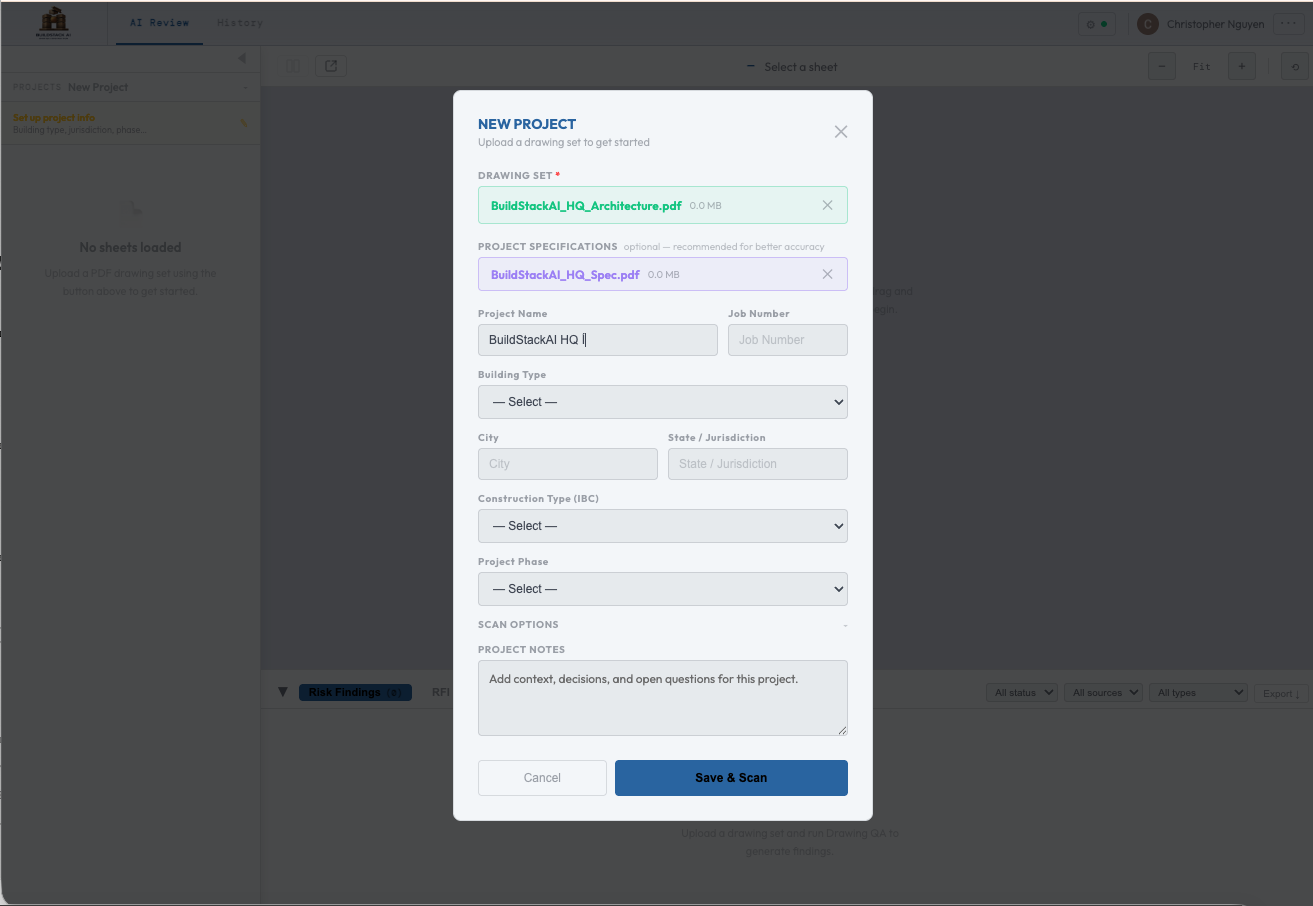
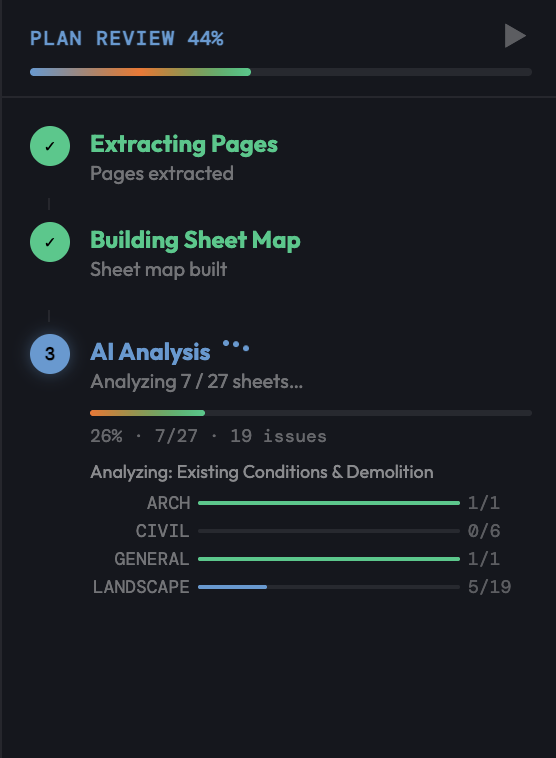
BuildStack AI allows users to upload construction drawing PDFs and specification documents for AI-powered analysis. The Service identifies potential issues including code compliance concerns, missing sheet references, coordination conflicts, and constructability risks.
4.2 Geographic Scope
The Service is intended for use within the United States. We do not target or market the Service to users outside the United States. While we do not block access from other countries, we make no representations that the Service is appropriate, accurate, or compliant with the laws of any jurisdiction outside the United States. If you access the Service from outside the United States, you do so at your own initiative and are solely responsible for compliance with your local laws. By using the Service, you consent to the transfer and processing of your data in the United States and acknowledge that the Service is not designed to comply with non-U.S. data protection frameworks, including the European Union General Data Protection Regulation (GDPR), and that such frameworks may not apply to our provision of the Service.
4.3 Service Availability
We strive to maintain high availability but do not guarantee uninterrupted or error-free access. The Service is provided without any uptime commitment or service level agreement (SLA). The Service may be temporarily unavailable due to maintenance, updates, or circumstances beyond our control. We will make reasonable efforts to provide advance notice of planned downtime.
4.4 Service Modifications
We reserve the right to modify, update, or discontinue features of the Service at any time. For material changes that significantly reduce functionality you are paying for, we will provide reasonable advance notice.
5. AI Outputs — Disclaimers and Limitations
5.1 AI Outputs Are Informational Only
All AI-generated analysis results, findings, issues, and recommendations provided by the Service are for informational purposes only. AI Outputs:
- Do NOT constitute professional advice, including but not limited to architectural, engineering, structural, safety, legal, or code compliance advice
- Do NOT replace professional plan review by licensed architects, engineers, code officials, or other qualified professionals
- May be incomplete, inaccurate, or unsuitable for your specific project, jurisdiction, or circumstances
- Are not guaranteed to identify all code violations, design conflicts, missing references, or other issues in your documents
5.2 No Guarantee of Results
We make no representation or warranty that:
- AI Outputs will identify all issues present in your construction documents
- AI Outputs are accurate, complete, current, or applicable to your jurisdiction
- The Service will detect every code compliance issue, coordination conflict, or design error
- AI Outputs comply with any specific building code, standard, or regulation
- AI Outputs are validated against any specific jurisdiction’s building code, edition year, or local amendments
5.3 User Verification and Sole Responsibility
You acknowledge and agree that you are solely responsible for independently verifying all AI Outputs and any information provided by the Service before relying on them for any purpose whatsoever. Specifically:
- You must independently verify all AI Outputs with qualified professionals before relying on them for any decision, action, submission, or filing
- You must maintain appropriate human oversight of all analysis results, including review by licensed architects, engineers, or other qualified professionals as applicable
- You bear sole responsibility for all decisions, actions, and outcomes resulting from your use of the Service and AI Outputs, whether or not you independently verify the results
- The Service is intended to supplement, not replace, professional plan review and due diligence
- You assume all risk associated with using the Service and AI Outputs in connection with any construction project, permit application, code compliance review, or other professional activity
- Any reliance on AI Outputs without independent professional verification is at your own risk
5.4 No Liability for AI Outputs or Service Results
To the maximum extent permitted by law, we are not liable for any damages, losses, claims, or expenses arising from:
- Your use of or reliance on the Service or AI Outputs
- Errors, omissions, or inaccuracies in AI Outputs or any information provided by the Service
- Issues that the Service failed to identify in your documents
- Any construction defects, code violations, safety issues, or regulatory non-compliance that AI Outputs did not flag
- Decisions or actions taken based on AI Outputs, whether or not you obtained independent professional verification
- Any consequences arising from your failure to independently verify AI Outputs
- Any use of AI Outputs in permit applications, construction documents, regulatory filings, or other professional submissions
5.5 AI Model Training
We may use your Customer Data to train, improve, and enhance our AI models and the Service. This may include using your uploaded documents and associated AI Outputs to improve the accuracy, reliability, and capabilities of our analysis features.
Opt-Out: You may opt out of having your Customer Data used for AI model training at any time by contacting us at privacy@buildstackai.com or through your account settings (when available). Once you opt out, we will cease using your Customer Data for training purposes going forward; however, models already trained prior to your opt-out may retain generalized learnings that cannot be specifically attributed to or extracted from your data.
Regardless of your training preference, we may use aggregated, de-identified data (such as accuracy metrics and feature usage patterns) to improve our algorithms and product quality. This data cannot be linked back to you or your projects.
6. Intellectual Property
6.1 Your Content
You retain all rights, title, and interest in your Customer Data, including all intellectual property rights in your uploaded documents, specifications, and project information. By uploading content, you grant us a limited, non-exclusive license to process, store, and display your Customer Data solely to provide the Service to you and, subject to Section 5.5 and your training preferences, to improve the Service and our AI models.
6.2 AI Outputs Ownership
AI Outputs generated from your Customer Data are provided to you for your use. You may use, modify, and incorporate AI Outputs into your work product. However, we make no representation that AI Outputs are original or non-infringing, and you are responsible for verifying their suitability before use.
6.3 Our Intellectual Property
We retain all rights, title, and interest in:
- The Service, including all software, algorithms, models, interfaces, and documentation
- All improvements, modifications, and derivative works of the Service
- Aggregated, de-identified analytics and insights derived from Service usage
- Our trademarks, logos, and brand assets
You may not reverse engineer, decompile, disassemble, or attempt to discover the source code or underlying algorithms of the Service.
6.4 Feedback
If you provide suggestions, ideas, or feedback about the Service (excluding Customer Data shared in support interactions), you grant us a non-exclusive, perpetual, irrevocable, royalty-free, sublicensable, worldwide license to use, modify, and incorporate that feedback into the Service without obligation to you.
7. Acceptable Use
You agree not to:
- Use the Service for any unlawful purpose or in violation of any applicable law or regulation
- Upload content that infringes on the intellectual property rights of others
- Upload malicious files, viruses, or harmful code
- Attempt to gain unauthorized access to the Service, other accounts, or related systems
- Interfere with or disrupt the Service or its infrastructure
- Use automated scripts, bots, or scraping tools to access the Service without our written consent
- Share your account credentials with unauthorized individuals
- Resell, sublicense, or redistribute the Service or its outputs without our written consent
- Remove or alter any proprietary notices, labels, or marks on the Service
- Use the Service to build a competing product or service
- Circumvent any usage limits, access controls, or security measures
- Upload content that contains sensitive personal information of third parties without proper authorization
We reserve the right to suspend or terminate your access for violations of this section.
8. Subscription and Payment
8.1 Plans and Pricing
The Service is offered under subscription plans as described on our website. Pricing, features, and usage limits vary by plan. We reserve the right to modify pricing with 30 days’ advance notice before your next renewal.
8.2 Billing
- Subscription fees are billed in advance on a monthly or annual basis, depending on your plan
- All fees are quoted and payable in U.S. dollars unless otherwise stated
- Payment is processed by our third-party payment processor(s). By providing payment information, you authorize us to charge the applicable fees. A list of our current payment processors is available upon request by contacting privacy@buildstackai.com
- You are responsible for all taxes, duties, and levies applicable to your subscription (excluding taxes on our income)
8.3 Auto-Renewal
Subscriptions automatically renew at the end of each billing period unless you cancel before the renewal date. By subscribing, you acknowledge and agree that your subscription will automatically renew and your payment method will be charged at the then-current rate until you cancel. You may cancel auto-renewal at any time through your account settings or by contacting us at privacy@buildstackai.com. Cancellation takes effect at the end of your current billing period.
8.4 Refunds
- Annual plans: If you cancel within 30 days of your initial purchase, you may request a full refund. After 30 days, no refunds are provided for the remainder of the term.
- Monthly plans: No refunds for partial months. Cancellation takes effect at the end of the current billing period.
- We may, at our sole discretion, issue refunds or credits in other circumstances.
8.5 Free Trials and Beta Features
- Free trials are provided “as is” without warranty or service level commitments
- We may modify or discontinue free trials at any time without notice
- Data entered during a free trial may be retained if you convert to a paid subscription, or deleted if you do not
- By using the Service during a free trial or beta period, you agree that your Customer Data may be used for AI model training as described in Section 5.5. The opt-out described in Section 5.5 becomes available upon conversion to a paid subscription. Use of Customer Data for training during the free trial period is part of the consideration for free access to the Service.
- Beta features are pre-release, may contain errors, and are not guaranteed to become generally available
- We have no liability for beta features beyond what is required by law
8.6 Late Payments and Suspension
If payment fails or is overdue, we may:
- Suspend your access to the Service after 7 days’ notice
- Recover reasonable collection costs, including attorneys’ fees
9. Data Handling
9.1 Data Storage
Customer Data is stored on Google Cloud infrastructure in the United States. See our Privacy Policy for details on how we collect, use, and protect your information.
BuildStack AI personnel may access Customer Data as necessary to operate, maintain, and support the Service, including for troubleshooting, security monitoring, abuse prevention, and responding to your support requests. Access is limited to authorized personnel and is subject to the confidentiality obligations in Section 10.
9.2 Data Retention
- Customer Data is retained while your account is active
- Deleted projects are soft-deleted (hidden from access) and may be permanently deleted upon request
- Upon account termination, you have 30 days to export your data. After the 30-day export window, we will permanently delete your Customer Data within 60 days, except as required for legal compliance
- Account information is retained for up to 1 year after account closure for legal compliance, dispute resolution, and fraud prevention purposes, after which it is deleted or de-identified. “Account information” means your name, email address, billing and payment transaction records, subscription history, and authentication identifiers — and expressly excludes Customer Data (as defined in Section 2), which is handled under the deletion timeline above
9.3 Data Portability
You may export your data (issues, findings, reports) in CSV or PDF format through the Service at any time during your subscription.
9.4 Data Security
We implement industry-standard security measures as described in our Privacy Policy. While we take reasonable precautions, no system is completely secure, and we cannot guarantee the absolute security of your data.
10. Confidentiality
10.1 Confidential Information
Each party acknowledges that it may receive confidential information from the other party. “Confidential Information” includes Customer Data, business plans, pricing, technical information, and any information marked as confidential.
10.2 Obligations
The receiving party agrees to:
- Protect confidential information with at least the same degree of care it uses for its own confidential information (and no less than reasonable care)
- Use confidential information only as necessary to fulfill obligations under these Terms, except as expressly permitted under Section 5.5 (AI Model Training)
- Not disclose confidential information to third parties except as permitted by these Terms
10.3 Exceptions
Confidentiality obligations do not apply to information that:
- Is or becomes publicly available without breach of these Terms
- Was known to the receiving party prior to disclosure
- Is independently developed without reference to the confidential information
- Is lawfully received from a third party without restriction
- Is required to be disclosed by law, regulation, or court order (with prompt notice to the disclosing party where permitted)
11. Warranty Disclaimers
THE SERVICE, INCLUDING ALL AI OUTPUTS, IS PROVIDED “AS IS” AND “AS AVAILABLE” WITHOUT WARRANTY OF ANY KIND, EXPRESS OR IMPLIED.
TO THE MAXIMUM EXTENT PERMITTED BY LAW, WE DISCLAIM ALL WARRANTIES, INCLUDING BUT NOT LIMITED TO:
- MERCHANTABILITY — fitness for commercial use
- FITNESS FOR A PARTICULAR PURPOSE — suitability for your specific needs
- ACCURACY — correctness of AI Outputs, analysis results, or recommendations
- NON-INFRINGEMENT — that use of the Service will not violate third-party rights
- AVAILABILITY — uninterrupted, timely, or error-free operation
- SECURITY — that the Service will be free of vulnerabilities or unauthorized access
- COMPLETENESS — that the Service will identify all issues in your documents
YOU EXPRESSLY ACKNOWLEDGE AND AGREE THAT YOUR USE OF THE SERVICE AND ANY RELIANCE ON AI OUTPUTS IS AT YOUR SOLE RISK. WE DO NOT WARRANT THAT THE SERVICE WILL MEET YOUR REQUIREMENTS, THAT AI OUTPUTS WILL BE ACCURATE OR RELIABLE, OR THAT ANY ERRORS WILL BE CORRECTED. YOU ARE SOLELY RESPONSIBLE FOR VERIFYING ALL RESULTS AND OUTPUTS BEFORE RELYING ON THEM FOR ANY PURPOSE.
12. Limitation of Liability
12.1 Exclusion of Consequential Damages
TO THE MAXIMUM EXTENT PERMITTED BY LAW, NEITHER PARTY SHALL BE LIABLE FOR ANY:
- Loss of profits, revenue, goodwill, or anticipated savings
- Loss of data or data corruption
- Business interruption or downtime
- Cost of substitute goods or services
- Indirect, special, incidental, exemplary, punitive, or consequential damages
ARISING FROM OR RELATED TO THESE TERMS OR THE USE OF THE SERVICE, REGARDLESS OF THE THEORY OF LIABILITY (CONTRACT, TORT, NEGLIGENCE, STRICT LIABILITY, OR OTHERWISE), EVEN IF ADVISED OF THE POSSIBILITY OF SUCH DAMAGES.
12.2 Liability Cap
OUR TOTAL AGGREGATE LIABILITY ARISING FROM OR RELATED TO THESE TERMS OR THE SERVICE SHALL NOT EXCEED THE GREATER OF:
- The total fees you paid to us in the twelve (12) months immediately preceding the event giving rise to the claim, or
- Fifty U.S. dollars ($50.00)
12.3 Exceptions to Liability Cap
The limitations in Sections 12.1 and 12.2 do not apply to:
- Either party’s indemnification obligations under Section 13
- Your obligation to pay fees owed under Section 8
- Your breach of Section 7 (Acceptable Use)
- Either party’s gross negligence, willful misconduct, or fraud
- Liability that cannot be limited under applicable law
12.4 Basis of the Bargain
The limitations and disclaimers in this section reflect a reasonable allocation of risk and are a fundamental part of the agreement between you and us. The Service would not be provided without these limitations.
13. Indemnification
13.1 Your Indemnification
You agree to indemnify, defend, and hold harmless BuildStack AI, Inc., its officers, directors, employees, and agents from and against any third-party claims, damages, losses, liabilities, and expenses (including reasonable attorneys’ fees) arising from:
- Your use of the Service
- Your breach of these Terms
- Your violation of applicable law or third-party rights
- Your Customer Data (including claims that it infringes third-party intellectual property)
- Decisions or actions taken based on AI Outputs where you failed to obtain independent professional verification as required by Section 5.3
13.2 Our Indemnification
We will indemnify, defend, and hold you harmless from third-party claims that the Service (excluding Customer Data and AI Outputs) infringes a valid U.S. patent, copyright, or trade secret. This obligation does not apply to claims arising from:
- Modification of the Service by anyone other than us
- Use of the Service in combination with products or services not provided by us
- Your continued use after being notified of the alleged infringement
- Use of the Service in violation of these Terms
- Free trial or beta features
13.3 Indemnification Process
The indemnified party must: (a) promptly notify the indemnifying party of the claim, (b) give the indemnifying party sole control of the defense and settlement, and (c) provide reasonable cooperation at the indemnifying party’s expense. The indemnified party may participate in the defense at its own expense.
14. Copyright Infringement (DMCA)
14.1 Reporting Copyright Infringement
If you believe that content available through the Service infringes your copyright, you may submit a notice under the Digital Millennium Copyright Act (DMCA) to our designated agent:
DMCA Agent
BuildStack AI, Inc.
1701 South 7th Street, Unit 1, San Jose, CA 95112
Email: privacy@buildstackai.com
Your notice must include:
- A physical or electronic signature of the copyright owner or authorized agent
- Identification of the copyrighted work claimed to be infringed
- Identification of the infringing material and information sufficient to locate it
- Your contact information (address, phone number, email)
- A statement that you have a good faith belief that the use is not authorized by the copyright owner, its agent, or the law
- A statement under penalty of perjury that the information in the notice is accurate and that you are the copyright owner or authorized to act on their behalf
14.2 Counter-Notification
If you believe your content was removed in error, you may submit a counter-notification containing:
- Your physical or electronic signature
- Identification of the removed material and its prior location
- A statement under penalty of perjury that you have a good faith belief the material was removed by mistake or misidentification
- Your name, address, phone number, and consent to jurisdiction of the federal court in your district (or Santa Clara County, California, if outside the United States)
14.3 Repeat Infringers
We may terminate the accounts of users who are repeat copyright infringers.
15. Term and Termination
15.1 Term
These Terms are effective when you create an account and remain in effect until terminated. Your Subscription term is specified in your plan and renews automatically as described in Section 8.3.
15.2 Termination by You
You may terminate your account at any time by:
Cancellation takes effect at the end of your current billing period. You remain responsible for all fees incurred through the termination date.
15.3 Termination by Us
We may suspend or terminate your account:
- Immediately — for material breach of these Terms, including violation of the Acceptable Use policy, non-payment after notice, or if required by law
- With 30 days’ notice — for any other reason, with a pro-rated refund of prepaid unused fees
15.4 Effect of Termination
Upon termination:
- Your right to access the Service ceases immediately (or at the end of your billing period, as applicable)
- You have 30 days after termination to request an export of your Customer Data
- After the 30-day export window, we will permanently delete your Customer Data within 60 days
- Account information (as defined in Section 9.2) is retained for up to 1 year for legal compliance and dispute resolution, then deleted or de-identified
- Any outstanding fees become immediately due and payable
15.5 Survival
The following sections survive termination: Sections 5 (AI Disclaimers), 6 (Intellectual Property), 10 (Confidentiality), 11 (Warranty Disclaimers), 12 (Limitation of Liability), 13 (Indemnification), 14 (DMCA), 16 (Governing Law), and 17 (General Provisions).
16. Governing Law and Dispute Resolution
16.1 Governing Law
These Terms are governed by and construed in accordance with the laws of the State of California, United States, without regard to conflict of laws principles.
16.2 Informal Resolution
Before filing any formal dispute, you agree to contact us at privacy@buildstackai.com and attempt to resolve the dispute informally for at least 30 days.
16.3 Arbitration
If the dispute is not resolved informally, it shall be settled by binding arbitration administered by the American Arbitration Association (AAA) under its Commercial Arbitration Rules. The arbitration shall be conducted in English in Santa Clara County, California, and the arbitrator’s decision shall be final and binding.
Each party shall bear its own attorneys’ fees and costs, and the parties shall share equally the arbitrator’s fees and AAA administrative costs, unless the arbitrator determines that a different allocation is appropriate.
16.4 Small Claims Court
Notwithstanding Section 16.3, either party may bring an individual action in small claims court in Santa Clara County, California (or the county where you reside) if the claim falls within the court’s jurisdictional limits.
16.5 Arbitration Opt-Out
You may opt out of the arbitration and class action waiver provisions in Sections 16.3 and 16.7 by sending written notice to privacy@buildstackai.com within 30 days of creating your account. Your notice must include your name, account email address, and a clear statement that you wish to opt out of arbitration. If you opt out, all disputes will be resolved in the state or federal courts located in Santa Clara County, California. Opting out does not affect any other provisions of these Terms.
16.6 Exceptions to Arbitration
Either party may seek injunctive or equitable relief in any court of competent jurisdiction to protect its intellectual property rights or confidential information, without first engaging in arbitration. Additionally, we may seek injunctive or equitable relief to enforce Section 7 (Acceptable Use) where we reasonably believe a violation poses an immediate threat to the Service, its users, or our infrastructure.
16.7 Class Action Waiver
YOU AGREE THAT ANY DISPUTE RESOLUTION PROCEEDINGS WILL BE CONDUCTED ON AN INDIVIDUAL BASIS AND NOT IN A CLASS, CONSOLIDATED, OR REPRESENTATIVE ACTION. You waive any right to participate in a class action lawsuit or class-wide arbitration.
17. General Provisions
17.1 Entire Agreement
These Terms, together with our Privacy Policy, any Subscription agreement, and any Data Processing Addendum, constitute the entire agreement between you and us regarding the Service and supersede all prior agreements, understandings, and communications.
17.2 Amendments
We may update these Terms from time to time. We will notify you of material changes via email or a prominent notice within the Service at least 30 days before the changes take effect. Your continued use after the effective date constitutes acceptance. If you do not agree to the updated Terms, you must stop using the Service before the effective date.
17.3 Assignment
You may not assign or transfer these Terms or your account without our prior written consent. We may assign these Terms in connection with a merger, acquisition, reorganization, or sale of all or substantially all of our assets, with notice to you.
17.4 Severability
If any provision of these Terms is found to be unenforceable, that provision will be modified to the minimum extent necessary to make it enforceable, and the remaining provisions will continue in full force and effect.
17.5 Waiver
Our failure to enforce any right or provision of these Terms does not constitute a waiver of that right or provision.
17.6 Force Majeure
Neither party is liable for failure to perform obligations due to circumstances beyond its reasonable control, including natural disasters, war, terrorism, pandemics, government actions, power failures, internet outages, or third-party service provider failures.
17.7 Notices
Notices to you will be sent to the email address associated with your account. Notices to us should be sent to:
BuildStack AI, Inc.
1701 South 7th Street, Unit 1, San Jose, CA 95112
Email: privacy@buildstackai.com
Notices are deemed received when delivered by email or three (3) business days after being sent by mail.
17.8 Independent Contractors
The parties are independent contractors. Nothing in these Terms creates a partnership, joint venture, agency, or employment relationship.
17.9 Third-Party Beneficiaries
These Terms do not create any third-party beneficiary rights.
17.10 Export Compliance
You agree to comply with all applicable export control and sanctions laws in connection with your use of the Service.
18. Enterprise and Organization Terms
18.1 Enterprise Agreements
If you access the Service under an enterprise or organizational agreement, the terms of that agreement take precedence over these Terms to the extent of any conflict.
18.2 Data Processing Addendum
Enterprise customers may request a Data Processing Addendum (DPA) that supplements these Terms with additional data protection commitments. Contact privacy@buildstackai.com for details.
18.3 Organization Administrators
If you use the Service as part of an organization, your organization’s administrator may have the ability to manage accounts, access project data, and enforce policies. Your use of the Service may be subject to your organization’s own policies.
18.4 Government and Public Entity Users
If you are a government agency, public entity, or any organization subject to public procurement laws, certain provisions of these Terms (including arbitration, indemnification, and liability limitations) may not be enforceable against you under applicable law. Government and public entity users must contact us at privacy@buildstackai.com to enter into a separate agreement that addresses these requirements. Your use of the Service without a separate agreement constitutes acceptance of these Terms to the maximum extent permitted by applicable law.
19. Contact Us
If you have questions about these Terms, contact us at:
BuildStack AI, Inc.
1701 South 7th Street, Unit 1, San Jose, CA 95112
Email: privacy@buildstackai.com